

ActiveCampaign is a powerful marketing automation platform that enhances client engagement and campaign management. This article explores how to gain access and invite users to ActiveCampaign, enabling seamless collaboration among marketing teams and clients. Follow this easy step-by-step guide tailored for clients to maximize productivity without any technical hassle.
Getting Started with ActiveCampaign Access
ActiveCampaign is an advanced email marketing, marketing automation, and sales CRM platform. This tool is important for clients working with marketing agencies as it facilitates effective communication, automation of marketing processes, and tracking of customer behaviours.
Gaining access to ActiveCampaign can be achieved in two ways. First, the marketing agency can extend an invitation to the client via email. After receiving this invitation, users simply click on the link provided to get started. If you do not receive an invitation, you can request one directly from the agency.
To login, users will need to create an account in ActiveCampaign. Follow the prompts provided after clicking on the invitation link for account creation. After creating your account, you can log in anytime using your credentials.
In case of login issues, ensure that your credentials are typed correctly. It is also important to check if your access hasn’t been revoked by the agency. Should you encounter other issues or have questions, don’t hesitate to reach out to the marketing agency or ActiveCampaign’s support team.
Understanding ActiveCampaign is key to leveraging this tool effectively, so take your time to familiarity with it upon logging in for the first time.
Inviting Users to Collaborate on ActiveCampaign
Now that you have logged into your ActiveCampaign account, you might need others to collaborate with you. Perhaps there are multiple people in your marketing team, or you need to collaborate with external agencies. In such cases, you need to invite users to your ActiveCampaign.
To invite a user, navigate to the ‘Settings’ menu, select ‘Users and Groups’ and then ‘Invite a user’. Here, you will need to input the email address of the new user and choose their role from the ‘Role’ dropdown menu.
ActiveCampaign offers four pre-set roles: Admin, Manager, User, and CRM User. Depending on the role selected, the invited user will have varying levels of permission. The good news is, you can customize roles based on the access an individual needs.
Once you’ve invited a user, you can manage the invitation from the same ‘Users and Groups’ page. This interface allows you to re-send or cancel invitations if necessary.
Remember, offering access should be done cautiously. In the next chapter, we’ll explore ways of managing user access effectively, discussing best practices to ensure a smooth collaboration. This will include updating permissions as roles change and ensuring clear communication between your team and external collaborators.
Best Practices for Managing Access and Collaboration
To ensure orderly collaboration and maintain security in ActiveCampaign, it is crucial to manage user access diligently. Begin by establishing a routine to regularly review user access. This routine should include an evaluation of who has access and to what extent, considering their responsibility within the team.
It’s also essential to promptly update permissions as roles change to avoid unnecessary access. When a team member’s role evolves, modify their permissions to reflect their new duties. This secures the platform and ends confusion about who can perform particular actions.
Remember, communication is vital. Maintain a transparent discussion about access and permissions between the agency and the client. By keeping everyone in the loop, you ensure the platform is used efficiently and safely.
Lastly, employ a keen focus on data privacy. ActiveCampaign contains sensitive information, and managing access responsibly safeguards this data. It’s recommended to limit access to only necessary parties and frequently update passwords to further strengthen security.
By following these best practices, you will foster a collaborative environment in ActiveCampaign while also ensuring your data security.
Conclusions
By following these straightforward steps, clients can confidently gain access to ActiveCampaign and invite the right users for effective collaboration. Proper management of access and user roles ensures secure and smooth teamwork between agencies and clients. Embracing these practices will streamline marketing efforts and improve overall campaign success with ActiveCampaign.
Alternative Access with LinkMyAgency
Another approach involves using LinkMyAgency to streamline the access process:
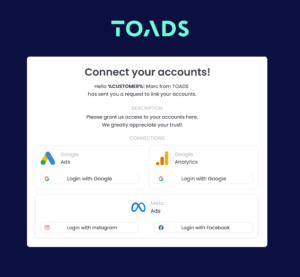
Send a Link: With LinkMyAgency, send a link to your client that allows them to easily grant you the necessary access without complex steps. No more frustration for either you explaining the steps, or your client not finding how to invite you.
Get Started with LinkMyAgency Sign up for a free 14-day trial in just a minute—no credit card required. Experience how LinkMyAgency can facilitate your agency operations, endorsed by industry giants like Meta, Google, and TikTok.