

ContentStudio is a powerful platform for content marketing and social media management. This article guides you through the process of gaining access to ContentStudio and inviting users, helping marketing agency clients collaborate smoothly and efficiently.
Creating Your Account on ContentStudio
The first step towards gaining access to ContentStudio is creating an account. Head over to the ContentStudio’s main page and click on the “Sign Up” button. You’ll need to enter your name, email, and preferred password, then follow the prompts to complete your profile setup.
For clients who don’t need to create their own account and are instead obtaining access from their agency, the process is even simpler. Agencies can grant clients access by adding them as users to their existing ContentStudio workspace. Agencies simply navigate to the user management section, locate the “Add User” button, and follow the prompts to add the client’s email address. Once added, clients will receive an email invitation to join the workspace.
Understanding User Roles and Permissions
ContentStudio assigns different roles and permissions to ensure the correct access rights for every user. Three key user roles are Administrators, Team Members, and Guests. Administrators have full access to all features and content management, whereas Team Members have limited access, useful for internal collaborators. On the other hand, Guest role can be assigned to external collaborators with restricted permissions.
It’s important for clients to understand their given role and its corresponding permissions, to ensure they have the access rights expected. Clients who need more extensive permissions or have any trouble with access should reach out to their agency contact for corrections or adjustments.
How to Invite Users to Collaborate on ContentStudio
After setting up your ContentStudio account, the next step would be to invite your team or other collaborators. To do this, first, navigate to the “Settings” section of your dashboard. Click on “Invitation and user management” to open the user invitation interface.
Enter the email address of the user you wish to invite, then assign them a role. In ContentStudio, you can assign different roles like “Admin”, “Member”, or “Guest”, depending on the user’s responsibilities.
If you’re inviting a team member who will need full access to editing and approval rights, the “Admin” role would be suitable. For clients or external collaborators who need view-only access, the “Guest” role would work best.
Upon completing these steps, ContentStudio will send an email invitation with an acceptance link. It’s important to advise the invited users to check their inbox, including spam or junk folders, if they can’t find the invitation.
If your invitee continues to experience issues receiving the invitation email, double-check if the invited email address was correctly entered, and try resending the invitation.
In the following chapter, we will delve deeper into how to manage user access effectively and setting up cybersecurity measures for smooth and efficient content collaboration in ContentStudio.
Best Practices for Managing User Access and Collaboration
While inviting users to your ContentStudio workspace is essential for collaborative work, managing user access post-invitation is fundamental for smooth teamwork. High on the list of good practices is regularly reviewing user roles. Clear communication about responsibilities tied to different access levels helps in avoiding confusions and streamlines content workflow. For example, a content creator should not have the same permissions as an editor or reviewer.
Security should be a priority; hence, remove inactive users on a regular basis to minimize security risks. Further, enforcing strong password policies and secure login procedures is advised. It’s important to note that ContentStudio ensures privacy and data security, collaboratively working with multiple users offers no compromise on this.
Remember, clear, proactive communication about role responsibilities not only avoids role conflict but also ensures a smooth content workflow. Cousins to this are regular updates about any changes in roles or access permissions.
Ensuring these best practices in managing user access in your ContentStudio will lead to effective collaboration and secure content management.
Conclusions
Gaining access and inviting users to ContentStudio is a straightforward process that enhances collaboration between marketing agencies and their clients. By following the steps and best practices outlined, clients can ensure they and their teams work efficiently and securely within the platform. Effective user management leads to better content strategies and successful marketing outcomes.
Alternative Access with LinkMyAgency
Another approach involves using LinkMyAgency to streamline the access process:
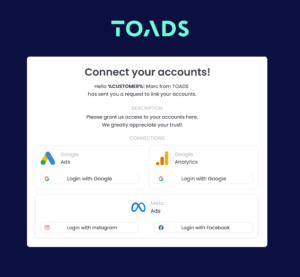
Send a Link: With LinkMyAgency, send a link to your client that allows them to easily grant you the necessary access without complex steps. No more frustration for either you explaining the steps, or your client not finding how to invite you.
Get Started with LinkMyAgency Sign up for a free 14-day trial in just a minute—no credit card required. Experience how LinkMyAgency can facilitate your agency operations, endorsed by industry giants like Meta, Google, and TikTok.